Miscellaneous
This page describes every change in Vinifera that wasn’t categorized into a proper category yet.
Vinifera hardcodes the shroud and fog graphics to circumvent cheating in multiplayer games.
Vinifera redirects saved screenshots using the keyboard command to a new sub-directory in the games folders,
Screenshots.Vinifera allows Skirmish games to be started with no AI house(s).
Vinifera implements the Blowfish algorithm into the Vinifera DLL itself, removing the requirement for the external BLOWFISH.DLL library. As a result, this allows the game will run without BLOWFISH.DLL registered on the target system or present in the installation directory. The game can still load encrypted mix files to be loaded without any issues.
Vinifera allows players to set a rally point for their service depot, similar to the functionality already available for factories.
OverlayTypes 27 to 38 (fourth Tiberium images) were hardcoded to be impassable by infantry. This limitation is removed.
Harvesters used to drop their cargo as Tiberium Riparius on death. They will now drop the Tiberium types they are carrying, instead.
It is no longer required to list all Tiberiums in a map to override some Tiberium’s properties.
FreeUnitorPadAircraftwould in some cases affect the cost of a building. This functionality has been removed.
Quality of Life
Harvesters are now considered when executing the “Guard” command. They have a special case when assigned with the Guard mission that tells them to find the nearest Tiberium patch and begin harvesting.
Harvesters now auto harvest when built from the war factory.
Vinifera changes the default value of
IsScoreShuffleto true.Vinifera changes the default value of
AllowHiResModesto true.Factories now hold their object if there is no war factory available for the unit to exit from instead of refuding construction.
Starting Unit Placement
Vinifera changes starting units to be placed in the same way as they are in Red Alert 2.
The starting unit placement in Tiberian Sun is awkward and requires the player to micro-manage their units before they can deploy the MCV. Now, with this change, the starting units are placed exactly like Red Alert 2, allowing the player (and the AI) to instantly deploy the MCV at the starting spawn location;

MCV Auto-deploy
Vinifera allow you to start the game with the MCV deployed, or have the MCV auto-deploy on start.
In RULES.INI:
[MultiplayerDefaults]
AutoDeployMCV=no      ; boolean, should player MCV's auto-deploy on game start?
PrePlacedConYards=no  ; boolean, should pre-place construction yards instead of spawning an MCV?
                      ; NOTE: This option only has an effect if the unit count is set to 1.
                      ; NOTE: This option has priority over AutoDeployMCV.
Prerequisites
Multi-MCV
Vinifera allows turning off the check for the house that built the MCV to allow giving each faction their own MCV (instead of a shared MCV).
In RULES.INI:
[General]
MultiMCV=no  ; boolean, should MCVs allow the construction of buildings of any house, not only the house that built them?
Sticky Technologies
In vanilla, technologies are “sticky”, that is, for example, if you lose a tech center, you will not lose access to objects that require a tech center until you lose all factories of the type. Vinifera allows turning off this behavior.
In RULES.INI:
[General]
RecheckPrerequisites=no  ; boolean, should prerequisites be rechecked, and unavailable items removed from the sidebar, when buildings are lost?
Multi-Engineer
Vinifera fixes
EngineerDamageandEngineerCaptureLevelto be considered by the game, like they were in Tiberian Dawn and Red Alert.
In RULES.INI:
[General]
EngineerDamage=0.0        ; float, the engineer will damage a building by this percent of its full health each time it enters.
EngineerCaptureLevel=1.0  ; float, if the building’s health is equal to or below this percentage of its strength it can be captured by an engineer.
Warning
Upon observing the values used in FIRESTRM.INI, this could potentially cause an issue with the vanilla game. FIRESTRM.INI has the values EngineerCaptureLevel=1.0 and EngineerDamage=0.0. Below are some values to help test these bug fixes and their potential impact on the vanilla game.
Red Alert Default values:
EngineerDamage=0.33
EngineerCaptureLevel=0.25
Red Alert Multiplayer (MPLAYER.INI) values:
EngineerDamage=0.33
EngineerCaptureLevel=0.66
Build off Ally
Vinifera implements the “Build Off Ally” feature from Red Alert 2 as a Quality of Life improvement. This is now the default behaviour for multiplayer games.
In RULES.INI:
[MultiplayerDefaults]
BuildOffAlly=yes                   ; boolean, can players build their own structures adjacent to structures owned by their allies?

[SOMEBUILDING]                     ; BuildingType
EligibleForAllyBuilding=<boolean>  ; Is this building eligible for proximity checks by players who are its owner's allies?
                                   ; For buildings with ConstructionYard=yes this defaults to yes, otherwise it defaults to no.
Window Title, Cursor and Icon
The game’s Window title, Cursor and Icon can be overridden. These controls are loaded from a new INI file,
VINIFERA.INI.
Note
While this is INI file is optional, it is recommended the ProjectName and ProjectVersion are set by the mod developer as this information is printed into debug logs and crash dumps to aid in the troubleshooting process.
In VINIFERA.INI:
[General]
ProjectName=     ; string, the project's title name string. Limited to 64 characters.
ProjectVersion=  ; string, the project's version string. Limited to 64 characters.
IconFile=        ; string, the name of the icon file (including the .ICO extension) to use for the games window. Limited to 64 characters.
CursorFile=      ; string, the name of the cursor file (including the .CUR extension) to use for the game's cursor. Limited to 64 characters.
Note
The filenames also support subdirectories.
Custom Saved Games Directory
By default Vinifera changes the game to save games into a subdirectly called
Saved Games. This can be customized.
In VINIFERA.INI:
[General]
SavedGamesDirectory=Saved Games  ; string, the name of the directory in which to save games.
Note
Subdirectories are also supported, e. g. Tiberian Sun\Saved Games.
File System
GENERIC.MIXandISOGEN.MIXmixfiles can now be used to place common assets between theaters.The game now loads
ELOCAL(00-99).MIXexpansion mixfiles. These can be used to override files normally found inLOCAL.MIX.Vinifera reimplements the file search path override logic of
-CDfrom Red Alert. This effectively allows the end-user to copy the CD contents to the game directory and run the game without any CD required to be inserted. The argument supports multiple entries separated by the;character. Below are some examples:-CD.- Sets the games root directory as the location to search for the CD contents.-CDcd_path- Sets thecd_pathsub-directory as the location to search for the CD contents.-CDcd1;cd2;cd3- Sets the sub-directoriescd1,cd2, andcd3as the search locations for the CD contents.
Developer Features
You can enable the developer mode by running Vinifera (
LaunchVinifera.exe) with the command line argument-DEVELOPER. You can also explicitly enable the debug console with-CONSOLE.-NO_VERSION_STRINGcan be used to hide the build version number from the in-game view.
Note
If you are using Vinifera with the TS Client, you can add these to the ExtraCommandLineParams= in Resources\ClientDefinitions.ini
Do not release your project/mod with either of these arguments defined, they will break multiplayer!
The game will no longer fail to start if the startup mix files are not found.
Note
It is not recommended that you modify or remove any of the original mix files, this could lead to undefined behaviour and the Vinifera developers will not be able to troubleshoot any issue related to these changes.
The game will no longer fail if the side specific mix files are not found.
Rule Selection
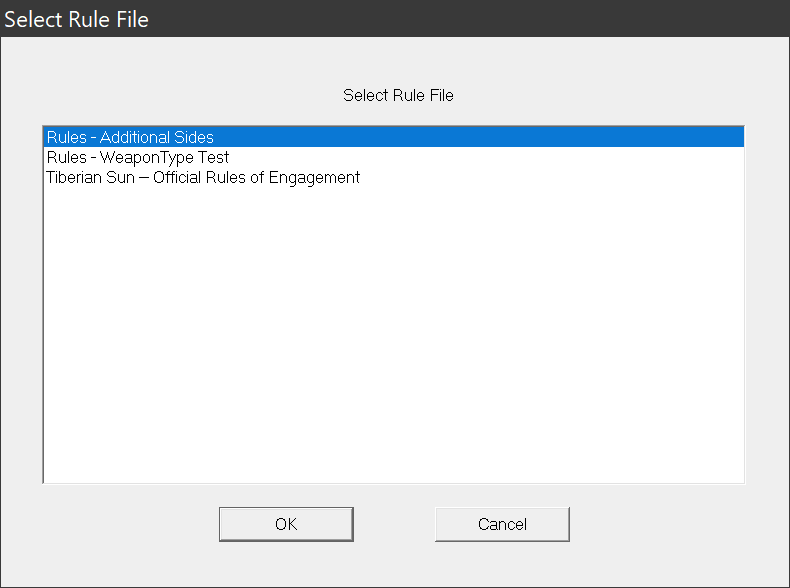
Vinifera re-enables a feature from Tiberian Sun’s development which allows you to select the Rules file if multiple are found in the game directory.
At startup, the game will scan for files in the root directory with the format
RULE*.INI, with*being a wildcard for any character or string (for example,RULE_VERSION1.INIorRULE_TEST_WEAPON.INI). While it has no impact on the loading, it is advised to use the formatRULE_*.INIto help with file sorting in Windows Explorer.The name shown in the dialog is the value of the
Name=(with a limit of 128 characters) entry under[General]in the Rule INI. If the user presses Cancel on the dialog, the game will load the standardRULES.INIfile.
Note
Due to the nature of its use, this feature is only available when Vinifera is running in Developer Mode.
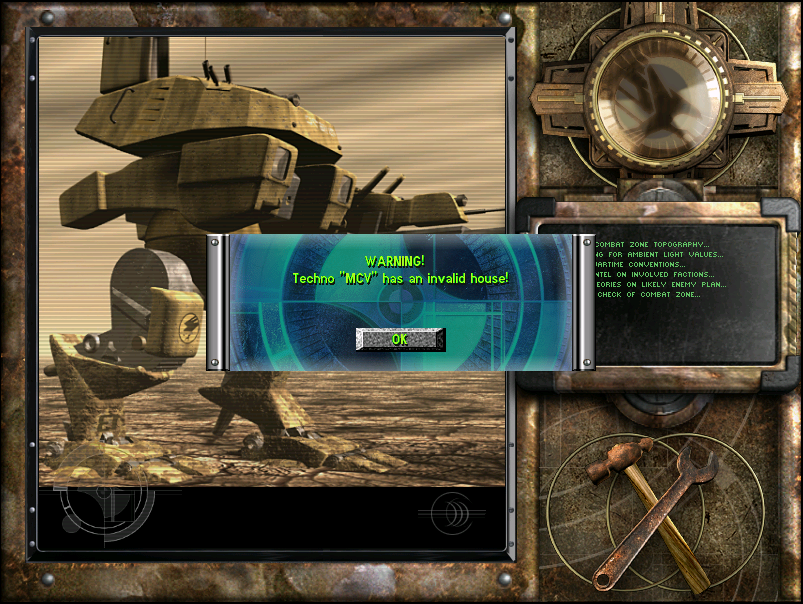
NULL house warning
Vinifera adds a warning to the debug log output when a null house pointer is detected during the game loading screen.
Also, if the user has Developer Mode enabled, then a dialog will be shown to notify the user of the offending objects name.
Command Line Options
Vinifera adds a number of command-line arguments allowing the user to skip the startup movies, or skip directly to a specific game mode and/or dialog.
-NO_STARTUP_VIDEOSkips all startup movies.-SKIP_TO_TS_MENULoads the game directly into the Tiberian Sun main menu (also skips startup movies).-SKIP_TO_FS_MENULoads the game directly into the Firestorm main menu (also skips startup movies). This option has priority over the TS main menu argument.
The following options will be affected by the choice of menu you skip to, otherwise, they default to the Tiberian Sun game mode.
-SKIP_TO_LANLoads the game directly into the LAN dialog.-SKIP_TO_CAMPAIGNLoads the game directly into the Campaign dialog.-SKIP_TO_SKIRMISHLoads the game directly into the Skirmish dialog.-SKIP_TO_INTERNETLoads the game directly into the Internet dialog.-EXIT_AFTER_SKIPThis option tells the game to exit when you press Cancel or Back from the dialog you skipped to.
Developer Commands
[ ] Memory Dump
Produces a mini-dump of the memory for analysis.
[ ] Dump Heap CRCs
Dumps all the current game objects as CRCs to the log output.
[ ] Dump Heaps
Dumps all the type heaps to an output log.
[ ] Dump Trigger Info
Dumps all existing triggers, tags, and local and global variables to the log output.
[ ] Reload Rules
Reloads the Rules and Art INI files.
Warning
This could very well crash the game, please use it with caution and make small incremental changes only!
[ ] Instant Build (Player)
Toggles the instant build cheat for the player.
[ ] Instant Build (AI)
Toggles the instant build cheat for the AI.
[ ] Instant Special Recharge (Player)
Toggles the instant recharge cheat for the players super weapons.
[ ] Instant Special Recharge (AI)
Toggles the instant recharge cheat for the AI player super weapons.
[ ] Place Infantry
Places a random infantry at the mouse cell.
[ ] Place Unit
Places a random unit at the mouse cell.
[ ] Place Tiberium
Places tiberium at the mouse cell.
[ ] Reduce Tiberium
Reduces tiberium at the mouse cell.
[ ] Place Fully Grown Tiberium
Places fully grown tiberium at the mouse cell.
[ ] Remove Tiberium
Removes tiberium at the mouse cell.
[ ] Toggle AI Control
Toggles AI control of the player house.
[ ] Toggle Frame Step
Toggle frame step mode to step through the game frame-by-frame (for inspection).
[ ] Step 1 Frame
Frame Step Only: Step forward 1 frame.
[ ] Step 5 Frame
Frame Step Only: Step forward 5 frames.
[ ] Step 10 Frame
Frame Step Only: Step forward 10 frame.
[ ] Build Cheat
Unlocks all available build options for the player house.
[ ] Toggle Elite
Toggle the elite status of the selected objects.
[ ] Damage
Apply damage to all selected objects.
[ ] Spawn All
Spawn all buildable units and structures at mouse cursor location.
[ ] Delete Object
Removes the selected object(s) from the game world.
[ ] Map Snapshot
Saves a snapshot of the current scenario state (Saved as ‘SCEN_
.MAP.).
[ ] Ion Storm
Toggles the ion storm on/off.
[ ] Bail Out
Exits the game to the desktop.
Note
Explosion and Super Explosion are currently disabled due to a possible engine bug.
[ ] Explosion
Spawns an explosion at the mouse cursor location.
[ ] Super Explosion
Spawns a large explosion at the mouse cursor location.
[ ] Ion Blast
Fires an ion blast bolt at the current mouse cursor location.
[ ] Lightning Bolt
Fires a lightning bolt at the current mouse cursor location.
[ ] Free Money
Hands out free money to the player.
[ ] Special Weapons
Grants all available special weapons to the player.
[ ] Capture Object
Take ownership of any selected objects.
[ ] Force Win
Forces the player to win the current game session.
[ ] Force Lose
Forces the player to lose the current game session.
[ ] Force Die
Forces all of the player’s units and structures to explode, losing the current game session.
[ ] Instant Build
Toggles the instant build cheat for the player.
[ ] Instant Build (AI)
Toggles the instant build cheat for the AI.
[ ] Toggle Shroud
Toggles the visibility of the map shroud.
[ ] Heal
Heal the selected objects by 50 hit points.
[ ] Toggle Inert
Toggles if weapons are inert or not.
[ ] Dump AI Base Nodes
Dumps all the current AI house base node info to the log output.
[ ] Toggle Alliance
Toggles alliance with the selected objects house.
[ ] Encroach Fog
Increase the fog of war by one step (cell).
[ ] Encroach Shadow
Increase the shroud darkness by one step (cell).
[ ] Toggle Berzerk
Toggles the berzerk state of the selected infantry.
[ ] Place Crate
Places a random crate at the mouse location.
[ ] Add Power
Adds 2000 power units to the player.
[ ] Cursor Position
Displays cell coordinates of the mouse cursor.
[ ] Cycle Starting Waypoints
Cycle the camera between the starting waypoints on the map.
[ ] Meteor Impact
Sends a meteor at the current mouse cell.
[ ] Meteor Shower
Creates a meteor shower around the current mouse cell.
INI
Add loading of
MPLAYER.INIandMPLAYERFS.INI(Firestorm only) to override Rules data for multiplayer games (including Skirmish). Data contained in these INI’s will not be loaded for the campaign and World Domination Tour games.